
How participants join your tour by scanning a QR code
Summarize with AI:ChatGPTClaudePerplexityGrokGoogle AI Mode
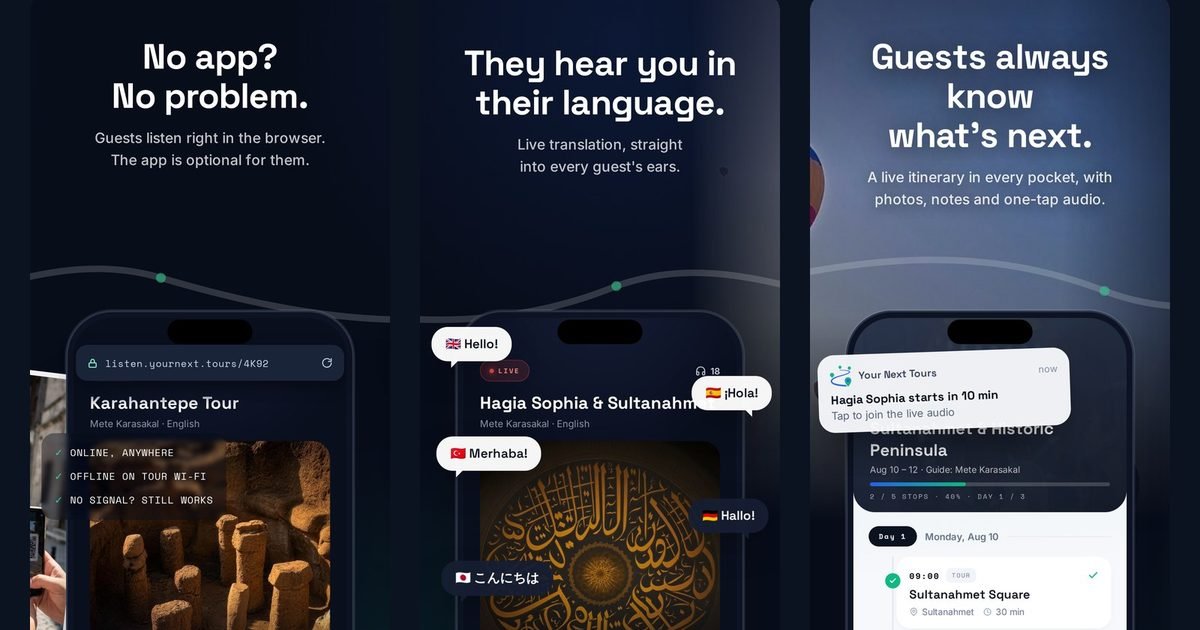
A participant joins by scanning a QR code with the phone camera and entering a name. That is the whole thing from their side: no download, no account, no password.
From your side there is one step before that and one habit worth building, and both are the difference between a group that is listening in two minutes and a group that is still fiddling at the five-minute mark.
What is the full sequence?
Five steps, and only the first two are yours.
- Switch on the portable WiFi router you carry and have the group join that network.
- Open the app, choose your tour and turn on the microphone; your phone becomes the broadcast server on that network.
- Show the QR code on your screen, or read out the short join code for anyone whose camera is being difficult.
- Participants scan with the phone camera; it opens straight in the browser.
- They enter a name and start listening through their own earphones.
Where do groups actually get stuck?
Two places, and neither is the QR code.
Joining the WiFi network. This is the step that looks invisible on a diagram and takes the longest in a car park. Save your router profile in the web panel before departure so the network name and password are ready, and say the network name out loud rather than expecting people to find it.
Cameras that will not scan. Older phones, cracked lenses, bright sun on a screen. The short join code exists for exactly this: read it out and let them type it. It takes ten seconds and it saves the one person who would otherwise spend the first stop offline.
| What you see | Likely cause | What fixes it |
|---|---|---|
| Code will not scan | Sun on the screen, old camera, scratched lens | Read out the short join code instead |
| Scanned, page will not load | Phone is not on the WiFi network yet | Join the network, then scan again |
| Joined but hears nothing | Phone on silent, or volume down | Check the silent switch before the volume |
| Audio drops at the far end of a site | Out of router range | Carry the router with the group |
| Phone dies mid-tour | Long day, old battery | Power bank; they rejoin with the same code |
What does the participant see afterwards?
Their phone becomes the listening device and nothing else is asked of them. The audio keeps playing when the screen locks or the phone goes into a pocket, so nobody has to walk around holding a lit screen.
If the signal weakens at the edge of the network, the connection re-establishes itself rather than requiring a rejoin. They can raise a hand from the screen, which puts them in a queue you can see and answer out loud, and at the end of the tour they can leave a rating and a comment.
What about people who arrive late?
They scan the same code and join mid-broadcast. There is no re-setup on your side and nothing to hand them, which is the practical difference from a receiver system: a latecomer is a ten-second interruption instead of a trip back to the bag.
The same applies to someone whose phone died and came back on a power bank halfway through the day.
Frequently asked questions
Do participants need to download an app?
Do participants need an account or a password?
What if someone's camera will not scan the code?
Does the audio stop when the phone screen locks?
Can somebody join after the tour has started?
Only the guide installs anything
Everything above runs from the guide's phone, which is the only device that needs the app. Guests carry on scanning and listening.
Related articles
 GuidesOnline or offline broadcast: which mode to use and when
 GuidesPortable WiFi router setup for tour groups: what to carry and how to run it
 GuidesQuiet guiding in China and Japan: loudspeaker bans from the Forbidden City to Kyoto's temples (2026)
 GuidesHow long should a group spend at an archaeological site?
 GuidesUS walking tour rules on loudspeakers and group size: Savannah, Charleston, New Orleans and Salem (2026)
 GuidesGroup audio rules at the Rijksmuseum, Van Gogh Museum and other Amsterdam sites (2026)